Note: every result on this page comes from simulations and open-source text-extraction tools we run ourselves. None of it is a test of a live Workday, Greenhouse, Lever, iCIMS, Taleo or SAP SuccessFactors system. None of it tells you what an employer decided. Employers set these systems up in different ways.
We sell résumé designs. Some of them have a sidebar, a photo or skill graphics. Those are the features people most often warn you about. So we pointed our own checks at our own designs and wrote down what failed.
Some of what broke was ours. We say so below.
What we ran, and what we did not
We publish two downloadable sets of evidence, and each answers a narrower question than “will this résumé get me an interview?”
- A release check on all 43 designs. Before a design ships, an automated check prints one fictional résumé in it as a PDF, reads the text back with one PDF reader (
pdf-parse1.1.1), and compares the extracted words with what was typed. Where a design allows moving sections between a sidebar and the main column, it tests those moves too. The certificates are re-issued every time a design or the code that draws it changes, always on US Letter paper with the same sample résumé. - A published extraction study. 40 fictional résumés — 10 profiles exported in both a single-column layout and a sidebar layout, as PDF and Word
.docx— read across 80 runs by four open-source text-extraction libraries. Every input file, extracted.txtfile,results.jsonsummary and reproduction script is public on our parse tests page.
What we did not do: run each of our 43 designs through live vendor accounts, or publish a 43-design by 6-system matrix. We have not done that run, and we will not guess at its results here.
Our designs, by layout
Of our 43 live designs, 22 are single-column, 18 have a sidebar and 3 have two columns. Those counts come directly from each design’s declared layout contract.
All 43 pass our release check today. That is less impressive than it sounds: a design that fails the release check cannot ship, so 43 of 43 passing is a gate, not a research finding.
The useful detail is how each layout class passes:
| Layout class | Live Guul designs | Declared layout score | What the release check certifies |
|---|---|---|---|
| Single-column | 22 designs | 90 / 100 |
Every section and entry reads back in top-to-bottom order |
| Two-column | 3 designs | 85 / 100 |
Words come back intact; side regions certified as unordered lists |
| Sidebar | 18 designs | 80 / 100 |
Words come back intact; sidebar certified as an unordered list |
In the 22 single-column designs, the check confirms the text reads back in sequence. In the 21 designs with a sidebar or a second column, the check certifies the side column as a list: the words come back, but different PDF readers can return the sidebar before, after or interleaved with the main column.
What broke in our own designs
The first time we ran our arrangement release check, on 26 July 2026, it tested 14 designs. Only 5 passed. 9 failed.
All 9 failures were designs with a sidebar or two columns. In 8 of them, moving the skills list from the sidebar into the main column changed what the PDF reader got back:
- In three designs, the extracted skills text shrank from 160 characters to 108.
- In three others, it shrank from 160 characters to 92, and jobs or schools also disappeared from what the reader found.
- In one design, two of five schools went missing and the skills text shrank from 160 characters to 154.
- In one design, one of seven jobs stopped being found.
In the ninth design, the check itself refused to write its record, so it gave no answer and no certificate at all.
All 4 single-column designs in that July run passed on the first try. So did one sidebar design, Onyx.
We repaired those bugs over the following rounds and re-ran the check. In one later round, we switched off section moving on three sidebar designs — Onyx, Ember and Summit — rather than offer a move we could not prove was safe. Today’s certificates prove section moves on all three again, after later rounds fixed what blocked them. Inside the builder, the download menu on every design also offers PDF — ATS Optimized, which prints your résumé in a single column with standard headings.
Where the text readers disagreed
Our published layout study read the same 40 fictional files across four open-source libraries. Here is how many expected fields each library recovered:
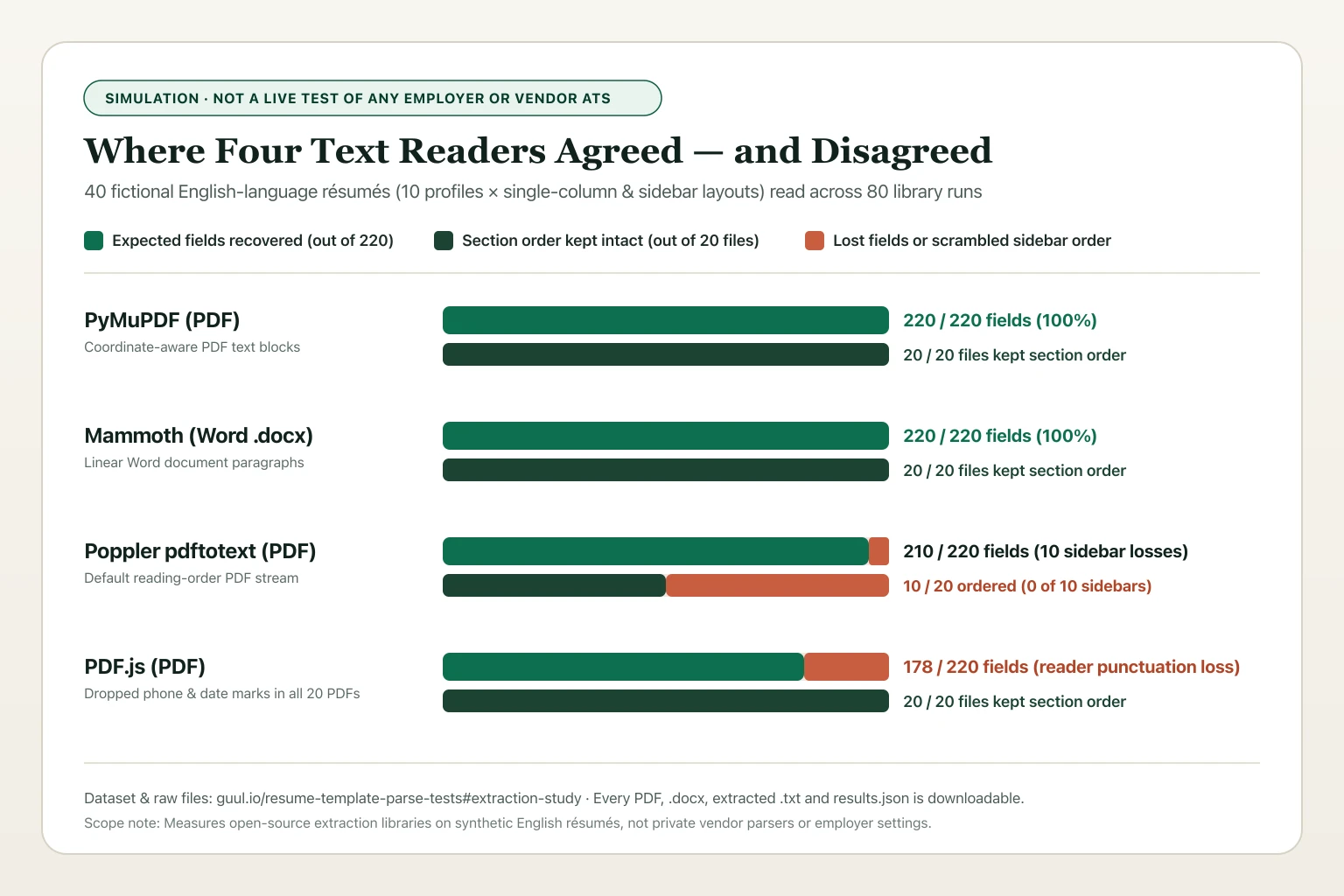
| Reader (simulation of text extraction, not an ATS) | Fields recovered | Section order kept |
|---|---|---|
| PyMuPDF (PDF) | 220 of 220 | 20 of 20 files |
Mammoth (Word .docx) |
220 of 220 | 20 of 20 files |
Poppler pdftotext (PDF) |
210 of 220 | 10 of 20 files |
| PDF.js (PDF) | 178 of 220 | 20 of 20 files |
Poppler (run with default reading-order settings) kept section order in all 10 single-column PDFs and in 0 of the 10 sidebar PDFs. All 10 fields it lost were in the sidebar files; 8 of them were degree names split across the summary text. For example, “Certificate in Business Administration” came back in two pieces with a sentence from the summary in between.
PDF.js dropped the punctuation in every phone number and the dash in every date range, in all 20 study PDFs — single-column and sidebar alike. +1 (202) 555-0101 came back as four separate groups of digits. It also returned a different apostrophe character in one name, Nora O’Neill, so that name did not match in either layout. The column layout did not cause these losses; the reader did.
So the honest answer to “do sidebars break parsing?” is: it depends on which reader touches your file. Two of the four libraries recovered every field from our sidebar files, in order. One scrambled every sidebar’s section order.
Hiring-system vendors also differ in what their own help pages warn about:
- Greenhouse explicitly lists multi-column layouts, tables, headers and footers, text boxes, graphics and scanned images in its Unsuccessful resume parse support guide.
- Lever notes in Understanding resume parsing that autofill extracts name, contact details, location and current company, advises applicants to check the filled fields, and mentions scanned files as a problem.
- SAP SuccessFactors notes in Knowledge Base Article 2081576 that résumé parsing cannot read scanned résumés saved as images.
- Oracle Taleo documents a default 1 MB candidate attachment limit in its Taleo Enterprise documentation, and we found no layout warnings in what it publishes.
Same story. A little more breathing room.
Switch the layout. Watch how spacing and hierarchy change the way this sample reads.
Alex Morgan
Product designerProfile
Product designer focused on making complex workflows easier to understand.
Experience
Product Designer · Example Studio
- Mapped the onboarding journey with the support team.
- Designed and tested a clearer account setup flow.
- Documented reusable components for the engineering team.
Skills
Interaction design · Prototyping · Design systems
Everything is asking for attention.
Closely packed headings and text leave fewer visual signposts. Try the other treatment.
Photos and skill graphics
We publish 49 template guide pages. 25 of them carry an explicit written layout note: 21 mention a photo, 21 mention graphics such as skill bars, 18 mention a sidebar and 3 mention two columns.
We have not run an isolated experiment that toggles only a photo or a skill bar on the same résumé to measure whether extracted text changes. Today those warnings come from what vendor help pages document, not from an isolated measurement of our own. Measuring that is still on our list.
What this means if you are choosing a design
- A single-column design came through every check we ran. When you do not know how an employer’s portal reads PDFs, a single-column layout — or exporting with PDF — ATS Optimized — avoids column-reading ambiguity altogether.
- A sidebar design can work, provided you inspect the exported file. Use the file inspector at the end of this page, or open your exported PDF, select all text, paste it into a plain note, and check that your contact details, job titles, employers and dates stay paired.
- A passing check is not an interview guarantee. Our checks use fictional English-language résumés, US Letter paper and named open-source tools. Your wording, your employer’s portal settings and human review decide what happens next.
Your experience. A fresh canvas.
Try a different look. These are actual Guul template previews, with illustrative sample content.
A clean slate. Literally.
One column, distinct sections, and room for your experience to lead. A simple place to start.
0 multi-column reading notes across all 6 modelled hiring systems.
See full template parse table →Replace all sample details with your own experience.Explore the resume lookbook →
How we did this, and the limits
- The arrangement release check uses one fictional résumé (
ats-certification-senior-lists), US Letter paper andpdf-parse1.1.1. It does not cover A4 paper. It does not cover Word files either, except for the few designs that also carry a separate Word certificate. - The published extraction study uses 10 fictional English-language profiles across 2 layouts and 4 open-source libraries (
PyMuPDF,Mammoth,PopplerandPDF.js). Download all 40 files and raw outputs on /resume-template-parse-tests. - Our resume checker models six hiring-system families from public vendor documentation; it never connects to a live vendor or employer account.
- We did not test other companies’ templates, so we make no claims about them.
Frequently asked questions
Did you test these resume designs inside live Workday or Greenhouse employer accounts?
No. Both checks described here run on our own infrastructure using open-source text-extraction libraries (pdf-parse, PyMuPDF, Mammoth, Poppler and PDF.js) paired with published vendor help documentation. Employers also set these systems up in different ways.
Why did 9 multi-column designs fail your first internal check in July 2026?
In 8 of them, moving the Skills list from a narrow sidebar into the main column made the PDF’s text lose part of the skills or whole entries, because of bugs in the code that draws those designs. In the ninth, the check refused to write its record. We fixed those bugs. Today the check runs before every release, and a design that fails it cannot ship.
How can I check whether my own PDF scrambles columns before I apply?
Drop your exported PDF into the browser-only inspector on this page or on Resume PDF Text Check. Your file stays in your browser tab. It shows the text in the order one PDF reader (PDF.js) extracts it, and flags section headings that land on the same line.