
Turn inspiration into your own evidence
Do not copy the career. Learn how the career is communicated.
Read the evidence
Notice where the example uses scale, change, ownership, and context.
Replace every fact
Write from your real work, even when your numbers or setting are different.
Check the result
Make sure the document remains readable, truthful, and aligned to the role.
Key Skills
Use only the skills you can support with real experience. The example shows the vocabulary; your evidence makes it credible.
Full IT Support Specialist Resume Example
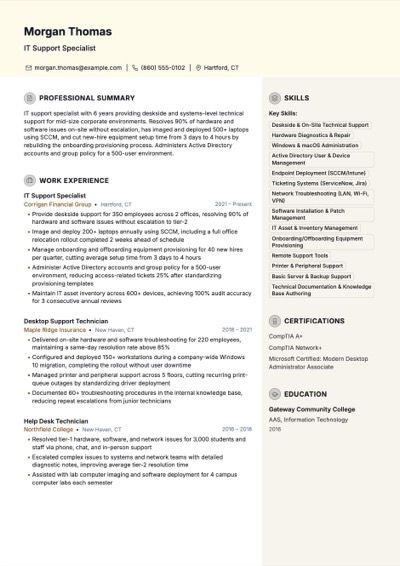
This is a complete fictional sample. Study the structure and evidence patterns, then replace every name, employer, number, skill, and accomplishment with information that is true for you.
Professional Summary
IT support specialist with 6 years providing deskside and systems-level technical support for mid-size corporate environments. Resolves 90% of hardware and software issues on-site without escalation, has imaged and deployed 500+ laptops using SCCM, and cut new-hire equipment setup time from 3 days to 4 hours by rebuilding the onboarding provisioning process. Administers Active Directory accounts and group policy for a 500-user environment.
Work Experience
IT Support Specialist
2021 – PresentCorrigan Financial Group — Hartford, CT
- Provide deskside support for 350 employees across 2 offices, resolving 90% of hardware and software issues without escalation to tier-2
- Image and deploy 200+ laptops annually using SCCM, including a full office relocation rollout completed 2 weeks ahead of schedule
- Manage onboarding and offboarding equipment provisioning for 40 new hires per quarter, cutting average setup time from 3 days to 4 hours
- Administer Active Directory accounts and group policy for a 500-user environment, reducing access-related tickets 25% after standardizing provisioning templates
- Maintain IT asset inventory across 600+ devices, achieving 100% audit accuracy for 3 consecutive annual reviews
Desktop Support Technician
2018 – 2021Maple Ridge Insurance — New Haven, CT
- Delivered on-site hardware and software troubleshooting for 220 employees, maintaining a same-day resolution rate above 85%
- Configured and deployed 150+ workstations during a company-wide Windows 10 migration, completing the rollout without user downtime
- Managed printer and peripheral support across 5 floors, cutting recurring print-queue outages by standardizing driver deployment
- Documented 60+ troubleshooting procedures in the internal knowledge base, reducing repeat escalations from junior technicians
Help Desk Technician
2016 – 2018Northfield College — New Haven, CT
- Resolved tier-1 hardware, software, and network issues for 3,000 students and staff via phone, chat, and in-person support
- Escalated complex issues to systems and network teams with detailed diagnostic notes, improving average tier-2 resolution time
- Assisted with lab computer imaging and software deployment for 4 campus computer labs each semester
Education
- AAS, Information Technology — Gateway Community College · 2016
Certifications
- CompTIA A+
- CompTIA Network+
- Microsoft Certified: Modern Desktop Administrator Associate
Achievement bullet patterns
Adapt the sentence pattern to your work. Never copy an employer, number, tool, or outcome that is not true for you.
- 1
Provided deskside support for 350 employees across 2 offices, resolving 90% of hardware and software issues without escalation to tier-2
Adapt the pattern; do not copy facts that are not yours.
- 2
Imaged and deployed 200 laptops using SCCM ahead of an office relocation, completing the rollout 2 weeks ahead of schedule
Adapt the pattern; do not copy facts that are not yours.
- 3
Managed onboarding and offboarding equipment provisioning for 40 new hires per quarter, cutting average setup time from 3 days to 4 hours
Adapt the pattern; do not copy facts that are not yours.
- 4
Administered Active Directory accounts and group policy for 500 users, reducing access-related tickets 25% after standardizing provisioning templates
Adapt the pattern; do not copy facts that are not yours.
Practical writing guidance
- 1
Separate deskside and systems work from phone-queue ticket counts; a line about imaging and deploying laptops via SCCM proves more technical depth than a raw ticket-volume number
- 2
Quantify onboarding turnaround, such as reducing new-hire equipment setup from 3 days to 4 hours, since specialists are often measured on employee-readiness speed
- 3
Name your device management and deployment tools precisely, SCCM, Intune, JAMF, since these keywords separate a systems-capable specialist from a tier-1 phone technician
- 4
Include Active Directory or systems administration tasks you own, such as account provisioning or group policy changes, to show you operate beyond the help desk queue
- 5
State your on-site escalation-avoidance rate if you track it, such as resolving 90% of hardware issues without escalating to infrastructure or vendor support
- 6
List certifications like CompTIA A+, Network+, or a Microsoft endpoint credential near the top, since they're commonly used as a resume screening filter
How to write an IT support specialist resume
Lead with deskside and systems work, not phone-queue ticket counts
Quantify deployment and onboarding speed the way employers actually measure readiness
Show Active Directory and systems-adjacent tasks to signal sysadmin-track potential
Frequently Asked Questions
How is an IT support specialist resume different from a help desk technician resume?
A help desk technician resume centers on phone and ticket-queue volume: calls handled, tickets closed, handle time. An IT support specialist resume should emphasize hands-on, on-site work instead: deskside repairs, device imaging, and Active Directory tasks beyond phone support.
Do I need CompTIA A+ or Network+ certification?
They're not always required, but they're commonly used as an automated screening filter, especially without a technical degree. A+ validates hardware and OS fundamentals, and Network+ signals you can troubleshoot connectivity beyond a basic reset. List both near the top if you hold them.
Should I list every software application I've supported?
No, group them by category, such as 'endpoint management (SCCM, Intune)' or 'productivity suites (Microsoft 365, Google Workspace),' rather than naming every application individually. This keeps the resume scannable while still hitting the keyword categories screening systems search for.
How do I show growth toward a systems administrator role?
Highlight tasks beyond desktop support, such as Active Directory account and group policy administration, or endpoint deployment tools like SCCM or Intune. These systems-adjacent tasks are what hiring managers look for when considering a specialist for a sysadmin track.